
What it is
DOSMesh brings Meshtastic messaging to vintage computer hardware — connected to a Heltec (or similar device) Meshtastic node over its serial port. It reads and writes the same protobuf-based serial protocol as the official Meshtastic apps, so a vintage computer can join a modern LoRa mesh, see who's on it, and hold a conversation. No emulation tricks, no bridge software translating on a modern machine in the middle — the PC talks directly to the node over serial, decodes the packets itself, and shows the results on the PC.
Features
**Channels**
- Displays your device's saved channels (Primary and secondary)
- Create new channels, generate new PSK keys
- Share channels VIA PSK keys
- Sort by Name or Recent activity
- Delete channels
**Chats Window**
- Displays your current conversation for the selected channel or node
- All Chats mode to see all messages in one window
- Click on a node in the chat window to see details or send a direct message
**Direct Messages**
- Double click a node from the nodes list to start a direct message chat with that node. Node chat is added to the channels list when sending or receiving direct messages.
- Double click any node in a chat to direct message them
**Node awareness**
- Live node roster for up to 500 devices on the mesh with the
- Sort nodes by Name or Recently active
- Per-node detail window: battery level (or "AC Powered" for mains-fed nodes), signal strength (RSSI), signal-to-noise ratio (SNR), plus more
- Add node favorites and pin to top of the list
- Periodic re-sync with the connected node so the roster doesn't go stale during a long session — new devices and updated names catch up automatically rather than freezing at launch-time.
**Status Bar**
- Serial Connection status.
- Node Voltage display
- Nodes seen counter
- RAM Memory usage/Memory free
**Built for real hardware**
- Currently designed for 16 bit systems - 286 and higher. Currently only uses around 300KB of RAM
- 8086 Version will follow with some restrictions to fit into less RAM
- Serial and sound diagnostic logging for troubleshooting a live mesh connection, toggled independently and safe to leave on.
- Com port selection 1-4
- Baud rate and IRQ settings
- Mouse support
Why it exists
Why not? Its super geeky 😀
Requirements
- Currently a 286 or higher running DOS (8086 version in the works) 8088 support coming soon
- Heltec or similar Meshtastic node with ProtoBufs serial protocol enabled
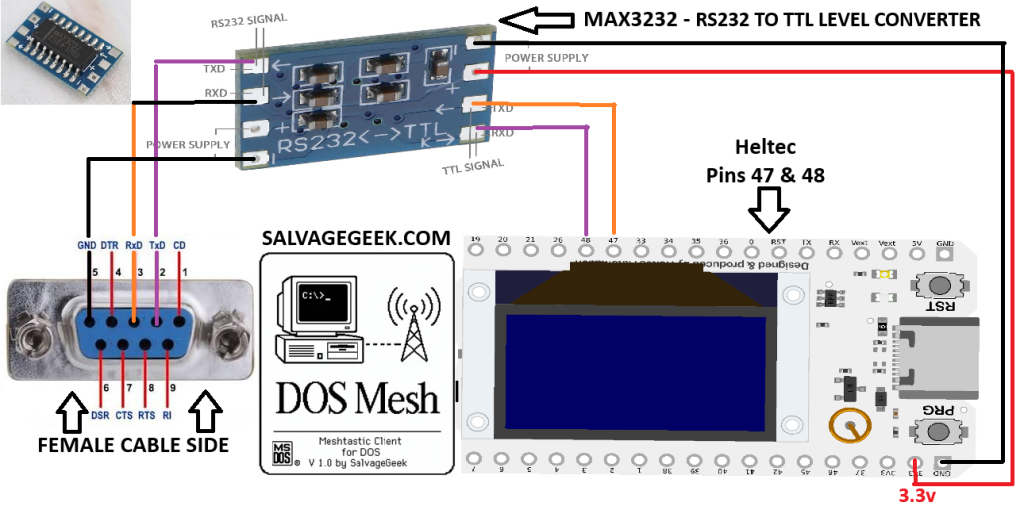
- A TTL to RS-232 converter (Max 3232)
- A DB-9 Female serial cable
Wiring Diagrams
How to connect your Meshtastic device to a PC
Meshtastic Configuration
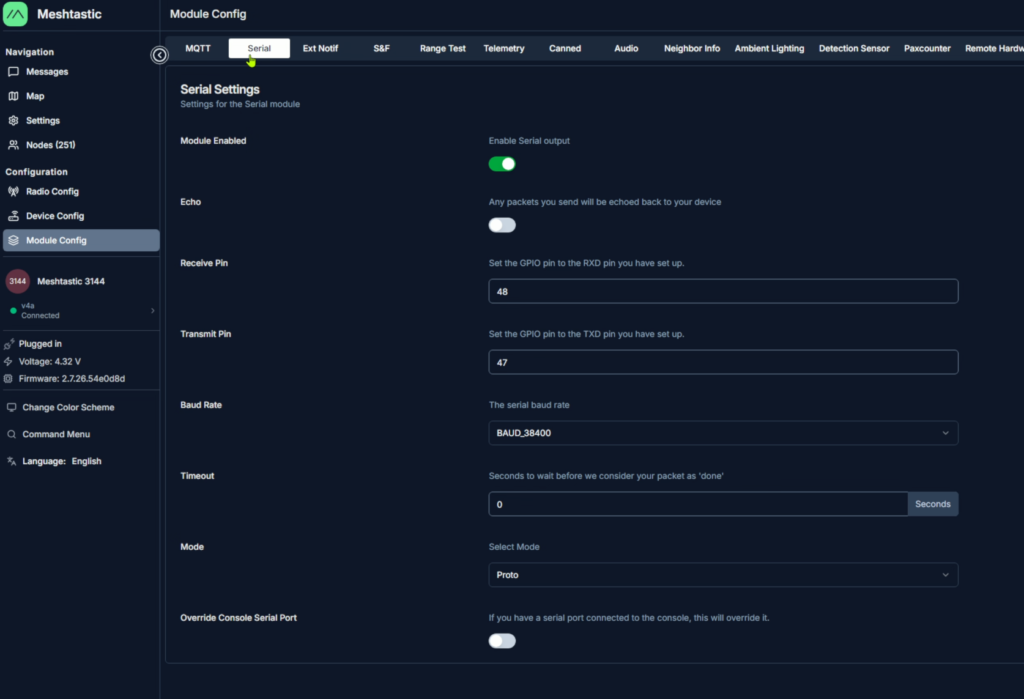
In Meshtastic --> Module Config --> Serial
Enable Serial output
Receive Pin --> 48
Transmit Pin --> 47
Baud Rate --> 38400
Timeout --> 0
Mode --> Proto (or Protobufs)
Startup Instructions
- You can just run doshmesh.exe and you should be good to go.
- If you want to use a mouse and don't already have a mouse driver installed, Cute Mouse is included for mouse support. Run ctmouse.exe to load mouse drivers if you don't already have one set up. Be sure to unplug the Heltec from the serial port when cutemouse loads it's driver. It can cause a crash when scanning the com port.
- Video modes are automatically detected on startup, but if you have issues you can start it manually in your desired video mode.
DOSMESH /VIDEO:80x50
DOSMESH /VIDEO:80x25
DOSMESH /VIDEO:80x28
DOSMESH /VIDEO:80x30
DOSMESH /VIDEO:80x34
DOSMESH /VIDEO:80x43
DOSMESH /VIDEO:80x50
DOSMESH /VIDEO:80x60
DOSMESH /VIDEO:132x25
DOSMESH /VIDEO:132x43
DOSMESH /VIDEO:132x50
DOSMESH /VIDEO:132x60
-
Downloads
DOSMesh Downloads
DosMesh
- For 286 and higher
- Roughly 300K of RAM required
Nice Work!