
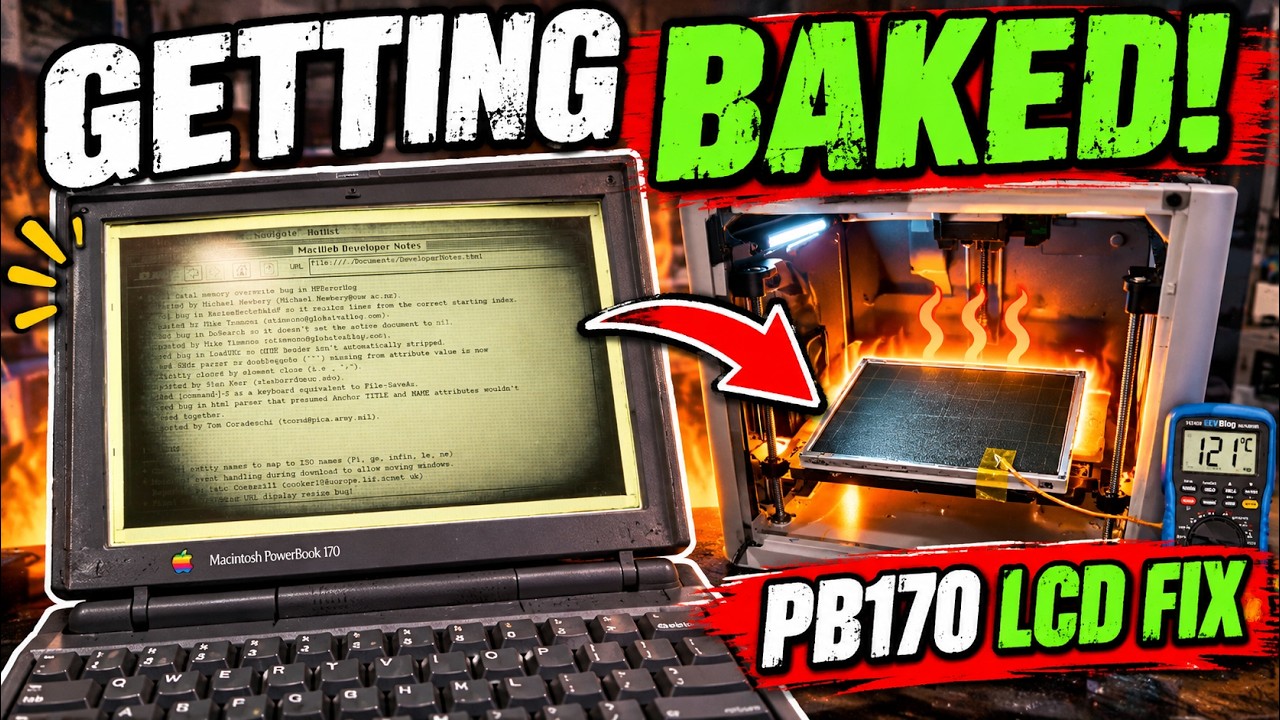
The Macintosh PowerBook 170, a beloved relic of the early computing era, is notorious for its frustrating LCD issue known as “tunnel vision.” As the display warms up over time, the edges of the screen darken and creep toward the center, rendering it nearly unusable. This common ailment has led many vintage tech enthusiasts to seek repairs, and one intriguing solution involves a process as unconventional as it is creative: baking the LCD.
Choosing an Innovative Approach
Rather than risking the integrity of the delicate LCD panel by using a conventional kitchen oven, the presenter in this video opts for a more controlled environment: the heated bed of a Bambu Lab X1 Carbon 3D printer. This decision highlights a growing trend in retro computing where modern technology is repurposed to breathe new life into aging hardware. The speaker carefully removes the LCD panel from the PowerBook and prepares it for the heat treatment on parchment paper, showcasing a blend of ingenuity and caution.
Monitoring the Heating Process
To ensure that the LCD is heated safely and effectively, the presenter uses a K-type thermocouple and a multimeter to monitor the bed temperature meticulously. Starting at a modest 50°C, he gradually increases the temperature to 70°C and finally to approximately 85°C. This methodical approach is crucial, as overheating could damage the sensitive components of the LCD. After maintaining this temperature for about nine hours, he allows the display to cool slowly—a critical step in preventing thermal shock that could further compromise the panel.
The Experiment and Its Implications
This repair process not only serves as an innovative solution for fixing the PowerBook 170’s display but also raises questions about the potential for using 3D printers in hardware repairs. The speaker’s experiment demonstrates that with the right tools and techniques, vintage electronics can be revived, offering a glimpse into the possibilities of retro repair. However, he also wisely cautions viewers that this is an experimental fix on aging hardware, urging them to proceed at their own risk.
A Journey of Restoration
Throughout the video, viewers are treated to a detailed teardown of the PowerBook 170 and a firsthand look at the tunnel vision problem. The engaging narrative builds anticipation as the speaker reveals whether the unconventional baking method proves effective in restoring the LCD to its former glory. This blend of nostalgia, technical ingenuity, and a dash of risk makes for a compelling journey into the world of retro computing.
In conclusion, the experiment not only highlights the challenges of maintaining vintage technology but also underscores the innovative spirit of the retro computing community. By leveraging modern 3D printing technology, enthusiasts can find new ways to tackle old problems, ensuring that these classic devices can continue to be appreciated for years to come.
The Macintosh PowerBook 170 has an infamous LCD problem known as “tunnel vision.” As the display warms up, the edges slowly darken and creep toward the center until the screen can become almost unusable.
Apparently, one of the more interesting fixes is to bake the LCD.
Rather than trust my ancient kitchen oven with a 30+ year old display, I decided to use the heated bed in my Bambu Lab X1 Carbon 3D printer. I removed the LCD panel, placed it on parchment paper, and monitored the actual bed temperature using a K-type thermocouple and multimeter.
I gradually brought the temperature up from around 50°C, then 70°C, and finally approximately 85°C, where I left the LCD for roughly 9 hours before allowing it to cool gradually.
Because apparently my 3D printer is also an LCD repair oven now.
In this video I tear into the PowerBook 170, show the tunnel vision problem, try the heat treatment, and find out whether baking a vintage LCD actually fixes it.
This is obviously an experimental repair on aging hardware, so try it on your own equipment at your own risk.
#PowerBook170 #VintageMac #RetroComputing #Macintosh #LCDRepair #Apple #BambuLab #RetroRepair
Watch on YouTube: Fixing PowerBook Tunnel Vision with a 3D Printer
Subscribe: Click here