
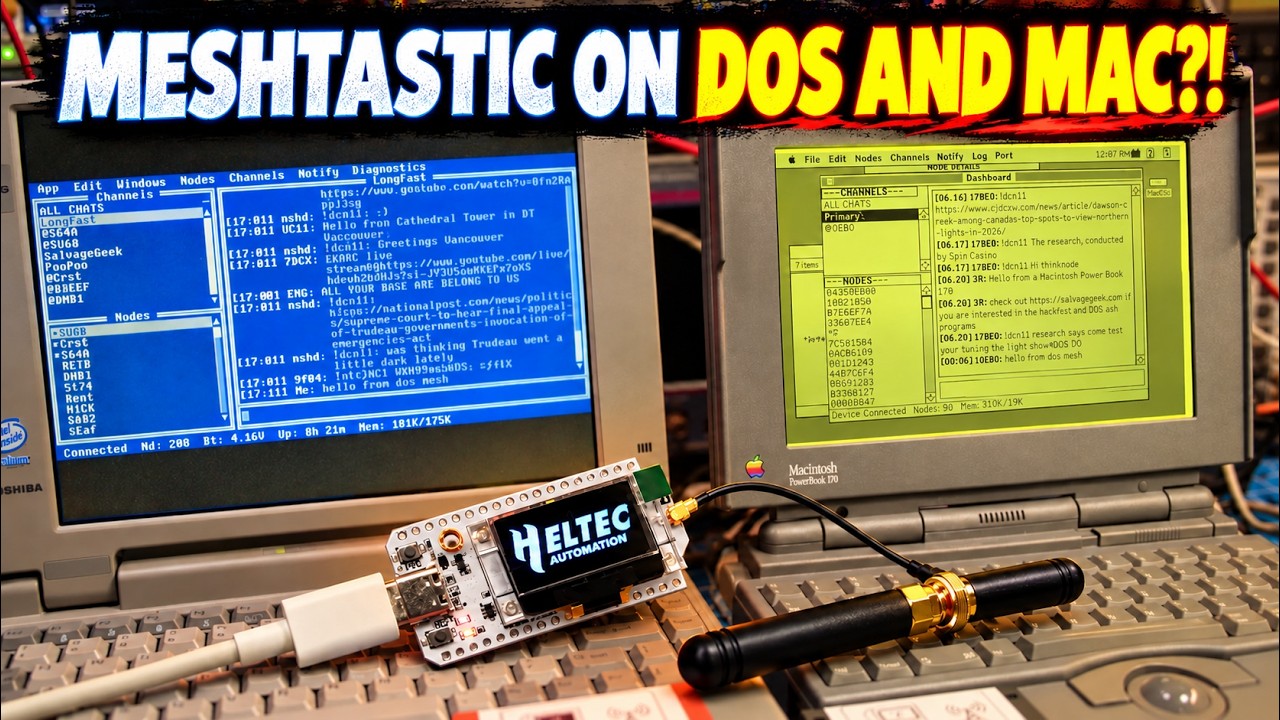
If you’re a fan of vintage computing and mesh networking, you’re in for a treat! In a recent video, the creator introduces a groundbreaking innovation: DOS Mesh, a Meshtastic client specifically designed for DOS PCs. This new application allows users to interact with Meshtastic radios, effectively creating a mesh network that can facilitate communication between devices in a unique and nostalgic way. The video showcases the interaction between DOS Mesh and MacMesh II, which operates on a classic PowerBook, highlighting the potential for cross-platform communication in the vintage computing space.
Exploring DOS Mesh
The video takes viewers on a tour of the DOS Mesh interface, which is inspired by the classic Phoenix BIOS design. The interface is user-friendly, featuring various functionalities such as channel chats, direct messaging, and an ALL CHATS view that provides a seamless experience for users. Additionally, the ability to view node details and set up channels makes DOS Mesh a comprehensive tool for anyone looking to engage in mesh networking on older hardware. The creator emphasizes the importance of maintaining usability while embracing the retro aesthetic.
Diving into MacMesh II
On the other side of the mesh network, MacMesh II impresses with its vibrant color-coded messaging system. Each message is beautifully displayed in the color corresponding to its channel or originating node, enhancing the visual experience of communication on the platform. Moreover, MacMesh II retains distinctive Mac features, including speech capabilities that further enrich the interaction for users. This combination of functionality and aesthetics makes MacMesh II a standout application for classic Mac enthusiasts.
Future Prospects and Expansions
The creator doesn’t stop with DOS and Mac; there are exciting plans for the future. Versions of DOS Mesh tailored for Windows 3.0 and Windows 95 are on the horizon, as well as a potential lower-memory edition for the 8086/8088 processors. This expansion promises to reach an even broader audience of vintage computing fans, allowing more devices to connect to the Meshtastic network.
Engaging the Community
As the video wraps up, the creator invites viewers to engage by suggesting which vintage computer they would like to see integrated into the mesh network next. This call to action not only fosters community involvement but also sparks curiosity about the endless possibilities of mesh networking across various platforms. Whether you’re a retro computing aficionado or just curious about modern applications of vintage tech, this initiative is certainly worth following.
For those interested in trying out DOS Mesh and MacMesh II, download links are provided in the video description. Embrace the nostalgia and dive into the world of vintage mesh networking today!
Two vintage laptops, two Meshtastic radios, one mesh. In this video I introduce DOS Mesh, a Meshtastic client built to target DOS PCs, and show it exchanging messages with MacMesh II on a PowerBook.
We’ll tour DOS Mesh’s Phoenix BIOS-inspired interface, channel chats, direct messages, ALL CHATS view, node details, and channel setup. Then we’ll look at MacMesh II, including its color-coded messages: each message uses the color of its channel or originating node. MacMesh II also retains its Mac-specific speech features.
Windows 3.0 and Windows 95 versions are planned next. I’d also like to explore a lower-memory 8086/8088 edition later.
Download DOS Mesh: https://salvagegeek.com/dos-mesh/
Download MacMesh: https://salvagegeek.com/macmesh/
See my original MacMesh Video on classic macs: https://youtu.be/8NlcsDqMw7Y?si=JTdZbWD6vHgkw2T8
What vintage computer would you like to see on the mesh next?
#Meshtastic #DOS #VintageComputing
Watch on YouTube: Meshtastic on DOS & MAC?! Meet DOS Mesh + MacMesh II
Subscribe: Click here