
A Meshtastic client for classic Macintosh - Talk to your mesh network on a machine older than the mesh radio itself.
What it is
MacMesh Plus is a native application that brings Meshtastic messaging to classic black-and-white Macintosh hardware — connected to a Heltec (or similar device) Meshtastic node over its modem port. It reads and writes the same protobuf-based serial protocol as the official Meshtastic apps, so a vintahe computer can join a modern LoRa mesh, see who's on it, and hold a conversation. No emulation tricks, no bridge software translating on a modern machine in the middle — the Mac talks directly to the node over serial, decodes the packets itself, and draws the result with the Mac's own Toolbox.
Features
** Newly added Features to MacMesh Plus **
- Fixed direct draw page flashing too often
- Toggle between Modem and Printer port
- Force "disable internal modem" on most powerbooks
- Add another user's channels via PSK key
- Share existing channels via PSK key
- Create a new channel and PSK key
- Chat history now saves in a config file
- Direct messaging to any Node in the chat or node list
- Add nodes as a favorite and pin to the top of the node list
- More info displayed in the Node info window
- Sort Channels and nodes alphabetically or by recently seen
- Draggable Nodes/Channels view pane sizing
- Various bug fixes
** New MacMesh II features**
- All features from MacMesh Plus
- Supports Macintalk 2 & 3 with 10 Voices
- Voice and pitch control
- Automatically falls back to Macintalk 1
- Windowed session for better multi-tasking
- Color chats, nodes, channels
- Auto detect 1bit or color display
- "All Chats" view shows all channels and nodes chats together
- Increased number of chats, nodes and channels
**Channels**
- Displays your node's channel list.
- The channel list sorts itself by most recent activity, newest conversation on top — just like a modern chat client.
**Direct Messages**
- Double click a node from the nodes list to start a direct message chat with that node. Node chat is added to the channels list when sending or receiving direct messages.
**Node awareness**
- Live node roster for up to 250 devices on the mesh with the 512K Version. 500 With the Plus version.
- Listed in order of last seen.
- Per-node detail window: battery level (or "AC Powered" for mains-fed nodes), signal strength (RSSI), signal-to-noise ratio (SNR), and last heard time.
- Periodic re-sync with the connected node so the roster doesn't go stale during a long session — new devices and updated names catch up automatically rather than freezing at launch-time.
**Notifications**
- Three notification modes for incoming messages: silent, an alert beep, or spoken aloud through MacinTalk text-to-speech — so the machine can literally read your mesh messages to you.
- Defaults to alert beep (This allows it to run on System 7 and up. Macintalk will only work on System 6.0.8 and lower)
**Status Bar**
- Serial Connection status.
- Node Voltage display
- Nodes seen counter
- RAM Memory usage/Memory free
**Built for real hardware**
- Runs on a stock Macintosh 512K, Plus, SE, SE/30 and more.
- Not just an emulator — developed and verified against real hardware over serial, not just tested in a simulator.
- Careful, from-scratch handling of the classic Serial Driver, MacinTalk's undocumented driver interface, and QuickDraw redraw performance, all tuned to stay responsive on an 8 MHz 68000.
- Optional serial and sound diagnostic logging for troubleshooting a live mesh connection, toggled independently and safe to leave on.
**Small footprint, period-correct feel**
- Fits comfortably within classic Macintosh OS memory and disk constraints.
- Custom splash screen and About box; standard Mac menu bar (File, Edit, Windows, Notify, Log) so it behaves like any other well-mannered System 6 application.
Why it exists
Meshtastic nodes are cheap, off-grid mesh radios — the kind of thing you carry hiking, hand out at a campsite, or use to keep a small community connected when the regular network is down. Classic Macintosh hardware is the opposite of cheap-and-disposable: it's kept alive because people love it, not because it's convenient. MacMesh exists because those two worlds had no reason to have ever met — and now they can talk to each other.
Requirements
- Macintosh 512K (or later 68k Mac)
- Heltec or similar Meshtastic node with ProtoBufs serial protocol enabled
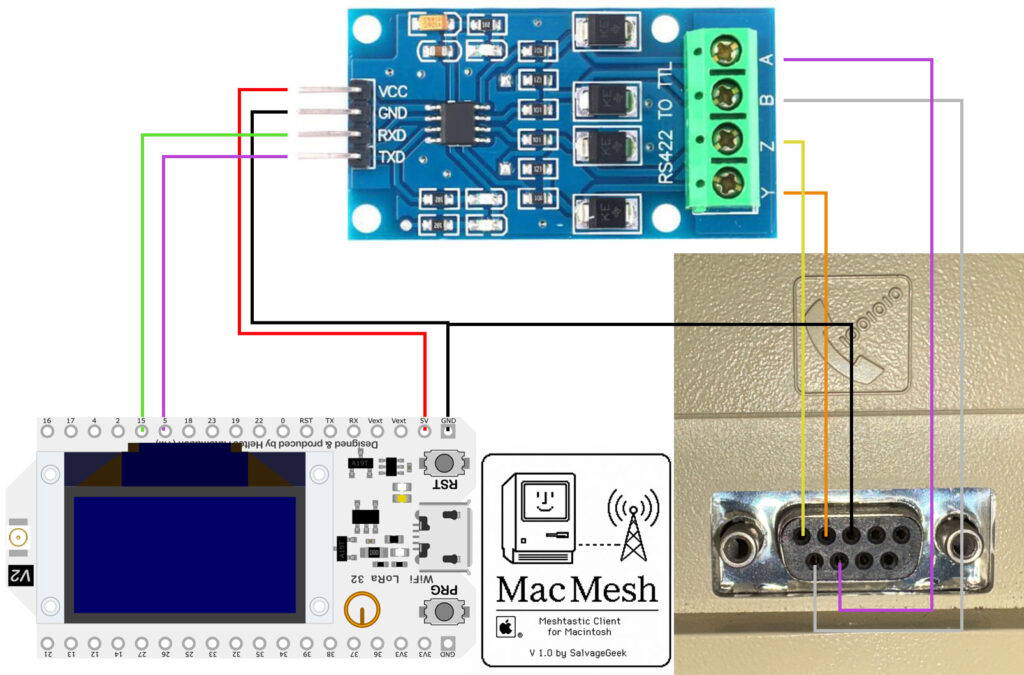
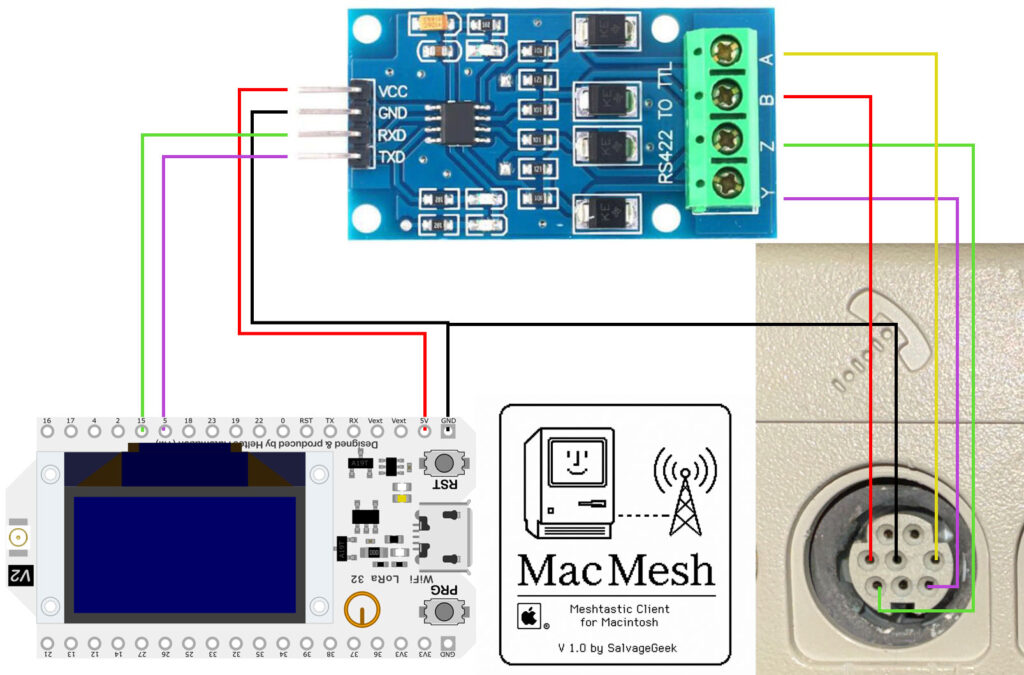
- A TTL to RS-422 converter (Max 490 or similar)
- An 8-pin Mini-DIN connector (Mac Plus and newer) or a 9-pin DB-9 Male serial cable (Macintosh 512K)
- MacinTalk speech driver installed (optional, for spoken notifications) ** This only works on system 1.1 - 6.0.8 ** - The application can be run on newer OS but Macintalk will not work. Version 2.0 is coming soon which will work on system 7 and up using Macintalk Version 2.
Credits
Special thanks to these valuable resources which made all of this possible:
- Retro68 - A GCC-based cross-compilation environment for 68K and PowerPC Macs - https://github.com/autc04/Retro68
- Macintalk - The original speech synthesis software made for the original Macintosh - Joseph Katz and Mark Barton
- Mini vMac - Hours of testing inside this virtual machine saved me a lot of time and hassle - https://www.gryphel.com/c/minivmac/
Wiring Diagrams
How to connect your Meshtastic device to the Macintosh
Meshtastic Configuration
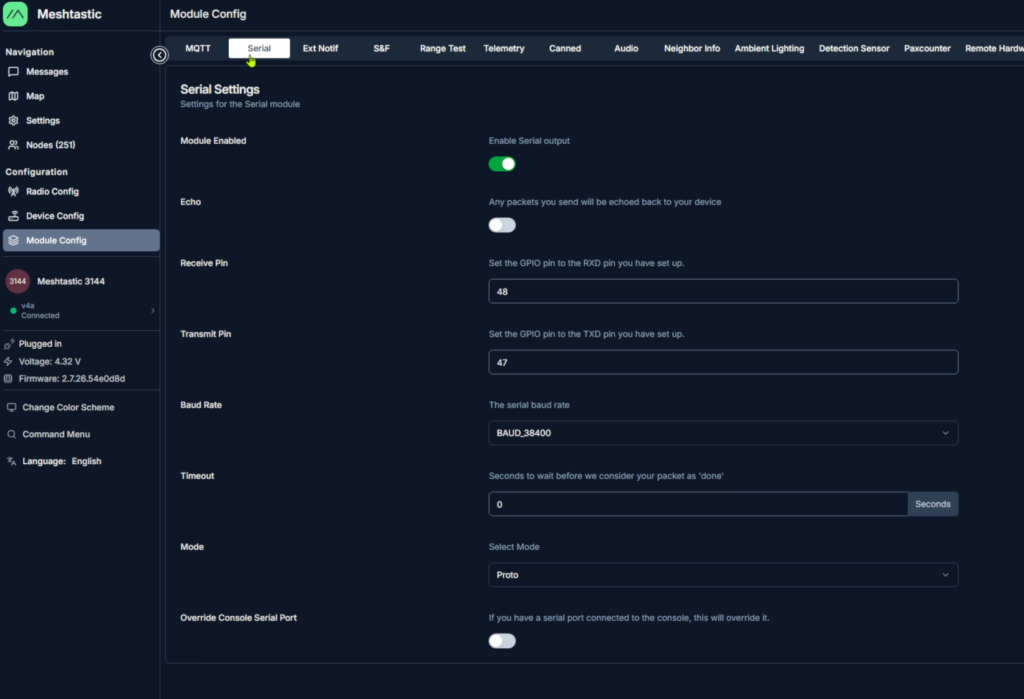
In Meshtastic --> Module Config --> Serial
Enable Serial output
Receive Pin --> 48
Transmit Pin --> 47
Baud Rate --> 38400
Timeout --> 0
Mode --> Proto (or Protobufs)
Installation Instructions
Just run it from anywhere! Its mostly that simple. Macintalk I should just work with the file in the same folder if you are running a system that is older than 7.0
MacMesh II requires the following files to be copied to the "Extensions" folder inside the system folder (If you don't already have Macintalk installed):
- Macintalk II
- Speech Manager
- Voices folder
Using the printer port for your serial device requires you to disable Apple Talk and restart the computer
Downloads
MacMesh Downloads
MacMesh 512K
- This is a bootable disk image using System 4.0 with the Finder removed.
- Optimized for 512K of RAM - Must be booted on its own
- 250 Nodes displayed
- 64 Chat messages
- 8 Channels + 8 Direct Message chats
- Download .dsk image (Floppy EMU or write to real disk)
- Download .hda image (Blue SCSI, Zulu SCSI, ETC)

MacMesh Plus
- This is a non-bootable disk image.
- Requires minimum System 3.0
- Macintalk 1 support (includes Macintalk file)
- Optimized for 1MB of RAM (With System & Finder running)
- 500 Nodes displayed
- 100 Chat messages
- 20 Channels + 20 Direct message chats
- Download .dsk image (Floppy EMU or write to real disk)
- Download .hda image (Blue SCSI, Zulu SCSI, ETC)
MacMesh II
- This is a non-bootable disk image.
- Designed for system 7 and newer
- Supports Macintalk 2 & 3 with 10 Voices and custom voice tuning
- 1MB of ram required
- 500 Nodes displayed
- 500 Chat messages
- Supports color
- Download .dsk image (Floppy EMU or write to real disk)
- Download .hda image (Blue SCSI, Zulu SCSI, ETC)